Stop Juggling multiple Apps to Run just Your single Business
All-in-One App for Photo & Video Pros Needs
Stop Juggling multiple Apps to Run just Your single Business
All-in-One App for Photo & Video Pros Needs
Still Managing Teams and Projects on WhatsApp, Excel, and Email? That’s Why You’re Not Scaling
Projects, tasks, teams, communication, invoices, SOPs, and payments — from the first proposal to final delivery, everything is in one app.
Still Managing Teams and Projects on WhatsApp, Excel, and Email? That’s Why You’re Not Scaling
Projects, tasks, teams, communication, invoices, SOPs, and payments — from the first proposal to final delivery, everything is in one app.
Still Managing Teams and Projects on WhatsApp, Excel, and Email? That’s Why You’re Not Scaling
Projects, tasks, teams, communication, invoices, SOPs, and payments — from the first proposal to final delivery, everything is in one app.

Testimonials
Testimonials
Testimonials
Testimonials
Mason Reed
PHOTOGRAPHER & STUDIO OWNER
"
I can focus on creating while SyncWynk takes care of the edits. The results are consistent, polished, and ready to post across all platforms.

Mason Reed
PHOTOGRAPHER & STUDIO OWNER
"
I can focus on creating while SyncWynk takes care of the edits. The results are consistent, polished, and ready to post across all platforms.
Mason Reed
PHOTOGRAPHER & STUDIO OWNER
"
I can focus on creating while SyncWynk takes care of the edits. The results are consistent, polished, and ready to post across all platforms.
Caleb Turner
VIDEO CONTENT CREATOR
"
The team handles transitions, color grading, and sound design flawlessly. It’s like having my own dedicated in-house editor.

Caleb Turner
VIDEO CONTENT CREATOR
"
The team handles transitions, color grading, and sound design flawlessly. It’s like having my own dedicated in-house editor.
Caleb Turner
VIDEO CONTENT CREATOR
"
The team handles transitions, color grading, and sound design flawlessly. It’s like having my own dedicated in-house editor.
Logan Fisher
Social Media Manager
"
Editing used to take days, and I often felt overwhelmed by the footage. SyncWynk captures the emotion and style perfectly, delivering polished edits quickly while meeting my standards. Projects are completed efficiently, making my workflow much smoother and my clients happier.

Logan Fisher
Social Media Manager
"
Editing used to take days, and I often felt overwhelmed by the footage. SyncWynk captures the emotion and style perfectly, delivering polished edits quickly while meeting my standards. Projects are completed efficiently, making my workflow much smoother and my clients happier.
Logan Fisher
Social Media Manager
"
Editing used to take days, and I often felt overwhelmed by the footage. SyncWynk captures the emotion and style perfectly, delivering polished edits quickly while meeting my standards. Projects are completed efficiently, making my workflow much smoother and my clients happier.
Jackson Cole
WEDDING VIDEOGRAPHER
"
From short-form social videos to full-length edits, the quality and attention to detail are unmatched. SyncWynk helps maintain a consistent style across all social channels, making content management much easier and letting me focus on creating engaging posts.

Jackson Cole
WEDDING VIDEOGRAPHER
"
From short-form social videos to full-length edits, the quality and attention to detail are unmatched. SyncWynk helps maintain a consistent style across all social channels, making content management much easier and letting me focus on creating engaging posts.
Jackson Cole
WEDDING VIDEOGRAPHER
"
From short-form social videos to full-length edits, the quality and attention to detail are unmatched. SyncWynk helps maintain a consistent style across all social channels, making content management much easier and letting me focus on creating engaging posts.
Lucas Morgan
CORPORATE VIDEO PRODUCER
"
The workflow is smooth and efficient. I upload raw clips, and within hours, they deliver polished edits ready for YouTube and social media.

Lucas Morgan
CORPORATE VIDEO PRODUCER
"
The workflow is smooth and efficient. I upload raw clips, and within hours, they deliver polished edits ready for YouTube and social media.
Lucas Morgan
CORPORATE VIDEO PRODUCER
"
The workflow is smooth and efficient. I upload raw clips, and within hours, they deliver polished edits ready for YouTube and social media.
Eli Parker
SOCIAL MEDIA CONTENT CREATOR
"
SyncWynk’s editing team transformed my footage into professional-quality videos. Fast turnaround and perfect results every time—I can’t imagine working without them.

Eli Parker
SOCIAL MEDIA CONTENT CREATOR
"
SyncWynk’s editing team transformed my footage into professional-quality videos. Fast turnaround and perfect results every time—I can’t imagine working without them.
Eli Parker
SOCIAL MEDIA CONTENT CREATOR
"
SyncWynk’s editing team transformed my footage into professional-quality videos. Fast turnaround and perfect results every time—I can’t imagine working without them.
HOW WE WORK
WEBAPP FEATURES
Streamline every aspect of your creative business with SyncWynk. From project planning and client management to editing, portfolios, and marketing insights, manage everything effortlessly in one platform.
HOW WE WORK
WEBAPP FEATURES
Streamline every aspect of your creative business with SyncWynk. From project planning and client management to editing, portfolios, and marketing insights, manage everything effortlessly in one platform.
HOW WE WORK
WEBAPP FEATURES
Streamline every aspect of your creative business with SyncWynk. From project planning and client management to editing, portfolios, and marketing insights, manage everything effortlessly in one platform.
1. Dashboard
Overview of opportunities, pipeline statuses, conversion rates, and project updates, providing an at-a-glance summary of all ongoing activities and progress metrics essential for tracking overall business performance efficiently.

2. Project Management
Add new projects directly. Edit project details such as type, date, time, and details like music titles. View project boards including client details, proposals, agreements, invoices, questionnaires, galleries, and checklists.

3. Communication
Built-in chat system enables seamless messaging with the team, allowing efficient real-time communication, quick problem-solving, easy sharing of updates, and streamlined collaboration, without the need for external messaging tools.

4. Client Management
Add and edit client details easily, while centralizing all client-related data. Manage contracts, invoices, proposals, questionnaires, and galleries, consolidating everything needed for a well-organized client relationship hub in one place.
5. Team Management
Add employees, monitor employee screens, track attendance, leave requests, and clock-in/out times. This enables efficient workforce management, ensures visibility of activities, and simplifies employee tracking for accountability and operational control.
6. Reference Materials / SOP Module
Reference tab provides access to all reference files. Build SOPs for team training to ensure consistent processes, knowledge sharing, and best practice implementation, helping teams operate efficiently and follow standardized workflows.
7. Music Library
Browse, add, and share categorized music within the library. Share music via links directly within the app or externally, ensuring media assets are well organized, easily accessible, and distributable by all users.
8. Onboarding Documents
Access onboarding documents including agreements, invoices, and proposals, allowing easy retrieval and management of essential documents needed for client onboarding and internal employee processes in a centralized and accessible manner.
9. Galleries
View client galleries, access images and videos, and manage them efficiently. Editing and advanced controls are available via web, making it possible to manage media assets without relying solely on the app interface.
10. Notifications
Push notifications inform about team messages, upcoming appointments, and task reminders, keeping all users consistently updated and aware of the latest developments, reducing the risk of missed actions or deadlines.
11. File Sharing
Share files and footage with the team, similar to Google Drive or other cloud storage solutions. This enables centralized storage of documents and media, simplifying file distribution and team collaboration significantly.
12. Financial Overview
Invoices and payments section allows viewing invoices, tracking expenses, and payment statuses. Advanced finance features track client payments, employee salaries, team expenses, and calculate per-project expense and profit margins efficiently.
13. Lead Generation
Leads scraping from Google automates the process of gathering potential client contacts. Collected leads are organized systematically to help improve follow-up efficiency, providing an easier way to manage incoming opportunities.
1. Dashboard
Overview of opportunities, pipeline statuses, conversion rates, and project updates, providing an at-a-glance summary of all ongoing activities and progress metrics essential for tracking overall business performance efficiently.
2. Project Management
Add new projects directly. Edit project details such as type, date, time, and details like music titles. View project boards including client details, proposals, agreements, invoices, questionnaires, galleries, and checklists.
3. Communication
Built-in chat system enables seamless messaging with the team, allowing efficient real-time communication, quick problem-solving, easy sharing of updates, and streamlined collaboration, without the need for external messaging tools.
4. Client Management
Add and edit client details easily, while centralizing all client-related data. Manage contracts, invoices, proposals, questionnaires, and galleries, consolidating everything needed for a well-organized client relationship hub in one place.
5. Team Management
Add employees, monitor employee screens, track attendance, leave requests, and clock-in/out times. This enables efficient workforce management, ensures visibility of activities, and simplifies employee tracking for accountability and operational control.
6. Reference Materials / SOP Module
Reference tab provides access to all reference files. Build SOPs for team training to ensure consistent processes, knowledge sharing, and best practice implementation, helping teams operate efficiently and follow standardized workflows.
7. Music Library
Browse, add, and share categorized music within the library. Share music via links directly within the app or externally, ensuring media assets are well organized, easily accessible, and distributable by all users.
8. Onboarding Documents
Access onboarding documents including agreements, invoices, and proposals, allowing easy retrieval and management of essential documents needed for client onboarding and internal employee processes in a centralized and accessible manner.
9. Galleries
View client galleries, access images and videos, and manage them efficiently. Editing and advanced controls are available via web, making it possible to manage media assets without relying solely on the app interface.
10. Notifications
Push notifications inform about team messages, upcoming appointments, and task reminders, keeping all users consistently updated and aware of the latest developments, reducing the risk of missed actions or deadlines.
11. File Sharing
Share files and footage with the team, similar to Google Drive or other cloud storage solutions. This enables centralized storage of documents and media, simplifying file distribution and team collaboration significantly.
12. Financial Overview
Invoices and payments section allows viewing invoices, tracking expenses, and payment statuses. Advanced finance features track client payments, employee salaries, team expenses, and calculate per-project expense and profit margins efficiently.
13. Lead Generation
Leads scraping from Google automates the process of gathering potential client contacts. Collected leads are organized systematically to help improve follow-up efficiency, providing an easier way to manage incoming opportunities.
1. Dashboard
Overview of opportunities, pipeline statuses, conversion rates, and project updates, providing an at-a-glance summary of all ongoing activities and progress metrics essential for tracking overall business performance efficiently.
2. Project Management
Add new projects directly. Edit project details such as type, date, time, and details like music titles. View project boards including client details, proposals, agreements, invoices, questionnaires, galleries, and checklists.
3. Communication
Built-in chat system enables seamless messaging with the team, allowing efficient real-time communication, quick problem-solving, easy sharing of updates, and streamlined collaboration, without the need for external messaging tools.
4. Client Management
Add and edit client details easily, while centralizing all client-related data. Manage contracts, invoices, proposals, questionnaires, and galleries, consolidating everything needed for a well-organized client relationship hub in one place.
5. Team Management
Add employees, monitor employee screens, track attendance, leave requests, and clock-in/out times. This enables efficient workforce management, ensures visibility of activities, and simplifies employee tracking for accountability and operational control.
6. Reference Materials / SOP Module
Reference tab provides access to all reference files. Build SOPs for team training to ensure consistent processes, knowledge sharing, and best practice implementation, helping teams operate efficiently and follow standardized workflows.
7. Music Library
Browse, add, and share categorized music within the library. Share music via links directly within the app or externally, ensuring media assets are well organized, easily accessible, and distributable by all users.
8. Onboarding Documents
Access onboarding documents including agreements, invoices, and proposals, allowing easy retrieval and management of essential documents needed for client onboarding and internal employee processes in a centralized and accessible manner.
9. Galleries
View client galleries, access images and videos, and manage them efficiently. Editing and advanced controls are available via web, making it possible to manage media assets without relying solely on the app interface.
10. Notifications
Push notifications inform about team messages, upcoming appointments, and task reminders, keeping all users consistently updated and aware of the latest developments, reducing the risk of missed actions or deadlines.
11. File Sharing
Share files and footage with the team, similar to Google Drive or other cloud storage solutions. This enables centralized storage of documents and media, simplifying file distribution and team collaboration significantly.
12. Financial Overview
Invoices and payments section allows viewing invoices, tracking expenses, and payment statuses. Advanced finance features track client payments, employee salaries, team expenses, and calculate per-project expense and profit margins efficiently.
13. Lead Generation
Leads scraping from Google automates the process of gathering potential client contacts. Collected leads are organized systematically to help improve follow-up efficiency, providing an easier way to manage incoming opportunities.
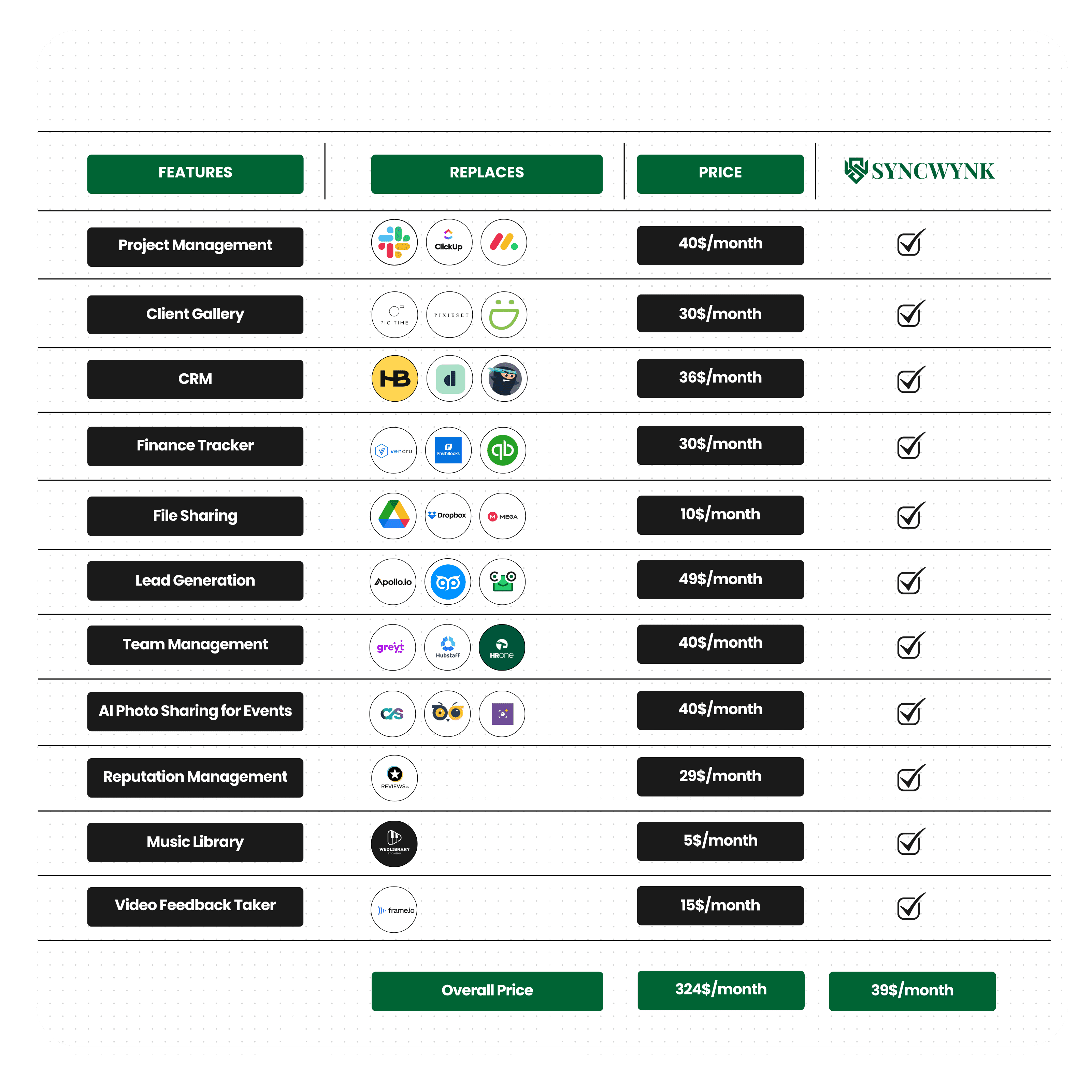
Comparison Chart
Comparison Chart
Comparison Chart
Comparison Chart
Comparison Chart
Pricing Plans
Choose the Perfect Plan for You
Find the right option and start making the most of our AI-powered platform today!
Pricing Plans
Choose the Perfect Plan for You
Find the right option and start making the most of our AI-powered platform today!
Get 2 months free with a 10-month purchase
Starter Plan
$0
/month
For beginners testing creative tools without commitment, perfect to explore features.
30-day free trial (no credit card required)
Dashboard
Project management
Music library access
After your 30-day free trial ends, if you don’t renew your subscription, your access to the full webapp (Solo Creator Plan) will be revoked.
Solo Creator
Most Popular
$39
/month
For creators managing clients and work while building a strong digital presence.
All features
Upto 5 teammates
1 TB Storage Included ($10 for each additional TB)
Premium Support
Get full access to the web app, add up to 4 teammates, and enjoy 1 TB storage. Need more? Upgrade to Studio Pro.
Studio Pro
$99
/month
For teams needing smart tools, insights, and easy collaboration across work.
All features
Up to 20 users included
2 TB Storage Included ($10 for each additional TB)
Priority support & updates
Get full access to the web app, add up to 20 teammates, and enjoy 2 TB storage. Need more? Contact us for the Production Plan.
Get 2 months free with a 10-month purchase
Starter Plan
$0
/month
For beginners testing creative tools without commitment, perfect to explore features.
30-day free trial (no credit card required)
Dashboard
Project management
Music library access
After your 30-day free trial ends, if you don’t renew your subscription, your access to the full webapp (Solo Creator Plan) will be revoked.
Solo Creator
Most Popular
$39
/month
For creators managing clients and work while building a strong digital presence.
All features
Upto 5 teammates
1 TB Storage Included ($10 for each additional TB)
Premium Support
Get full access to the web app, add up to 4 teammates, and enjoy 1 TB storage. Need more? Upgrade to Studio Pro.
Studio Pro
$99
/month
For teams needing smart tools, insights, and easy collaboration across work.
All features
Up to 20 users included
2 TB Storage Included ($10 for each additional TB)
Priority support & updates
Get full access to the web app, add up to 20 teammates, and enjoy 2 TB storage. Need more? Contact us for the Production Plan.
Production Plan
Our Production Plan allows you to add unlimited teammates and as much storage as you need. Contact our sales team for custom pricing.
Production Plan
Our Production Plan allows you to add unlimited teammates and as much storage as you need. Contact our sales team for custom pricing.
Production Plan
Our Production Plan allows you to add unlimited teammates and as much storage as you need. Contact our sales team for custom pricing.
Pricing Plans
Choose the Perfect Plan for You
Find the right option and start making the most of our AI-powered platform today!
Get 2 months free with a 10-month purchase
Starter Plan
$0
/month
For beginners testing creative tools without commitment, perfect to explore features.
30-day free trial (no credit card required)
Dashboard
Project management
Music library access
After your 30-day free trial ends, if you don’t renew your subscription, your access to the full webapp (Solo Creator Plan) will be revoked.
Solo Creator
Most Popular
$39
/month
For creators managing clients and work while building a strong digital presence.
All features
Upto 5 teammates
1 TB Storage Included ($10 for each additional TB)
Premium Support
Get full access to the web app, add up to 4 teammates, and enjoy 1 TB storage. Need more? Upgrade to Studio Pro.
Studio Pro
$99
/month
For teams needing smart tools, insights, and easy collaboration across work.
All features
Up to 20 users included
2 TB Storage Included ($10 for each additional TB)
Priority support & updates
Get full access to the web app, add up to 20 teammates, and enjoy 2 TB storage. Need more? Contact us for the Production Plan.
Production Plan
Our Production Plan allows you to add unlimited teammates and as much storage as you need. Contact our sales team for custom pricing.
Production Plan
Our Production Plan allows you to add unlimited teammates and as much storage as you need. Contact our sales team for custom pricing.
FAQs
FAQs
FAQs
FAQs
Who is SyncWynk webapp for?
SyncWynk is designed for: • Solo creators (freelance photographers/videographers, wedding shooters, part-time creatives). • Studios (small to mid-sized teams managing multiple projects, editors, and staff). • Production (any company with large teams of 10, 20, 50, 100, 1000 or more).
How does the Free Plan work?
You get 30 days of full access to all features and can add up to 4 teammates. After 30 days: • Upgrade to a paid plan to keep access. • Or continue with the free starter plan (limited features: Dashboard, Project Tab, Music Library).
How much storage do I get and Is my data safe?
• Solo Plan: 1 TB included (extra storage $10/TB/month). • Studio Plan: 2 TB included (extra storage $10/TB/month). • Production Plan: Custom storage options Contact sales Yes, SyncWynk uses secure object storage and encrypted connections to keep your files, galleries, and client information safe.
Can I add my team?
Yes. • Solo Plan → 1 user + 4 teammates. • Studio Plan → up to 20 users. • Production Plan → unlimited users (custom pricing).
Can I share galleries with clients?
Yes. You can upload and share final galleries, proposals, invoices, and onboarding documents directly through SyncWynk. Clients receive a professional, branded experience.
How is SyncWynk different from HoneyBook, Sprout Studio, or Dubsado?
Other platforms are built for all creatives. SyncWynk is built only for photographers and videographers, with niche-specific features like: • Music library • Team attendance + payroll • Per-project profit tracking • Lead generation • Full client hub (contracts, invoices, proposals, galleries in one place). We created this for the photography and videography business only.
Can I cancel anytime?
Yes, you can cancel or downgrade your plan anytime. No hidden fees.
Who is SyncWynk webapp for?
SyncWynk is designed for: • Solo creators (freelance photographers/videographers, wedding shooters, part-time creatives). • Studios (small to mid-sized teams managing multiple projects, editors, and staff). • Production (any company with large teams of 10, 20, 50, 100, 1000 or more).
How does the Free Plan work?
You get 30 days of full access to all features and can add up to 4 teammates. After 30 days: • Upgrade to a paid plan to keep access. • Or continue with the free starter plan (limited features: Dashboard, Project Tab, Music Library).
How much storage do I get and Is my data safe?
• Solo Plan: 1 TB included (extra storage $10/TB/month). • Studio Plan: 2 TB included (extra storage $10/TB/month). • Production Plan: Custom storage options Contact sales Yes, SyncWynk uses secure object storage and encrypted connections to keep your files, galleries, and client information safe.
Can I add my team?
Yes. • Solo Plan → 1 user + 4 teammates. • Studio Plan → up to 20 users. • Production Plan → unlimited users (custom pricing).
Can I share galleries with clients?
Yes. You can upload and share final galleries, proposals, invoices, and onboarding documents directly through SyncWynk. Clients receive a professional, branded experience.
How is SyncWynk different from HoneyBook, Sprout Studio, or Dubsado?
Other platforms are built for all creatives. SyncWynk is built only for photographers and videographers, with niche-specific features like: • Music library • Team attendance + payroll • Per-project profit tracking • Lead generation • Full client hub (contracts, invoices, proposals, galleries in one place). We created this for the photography and videography business only.
Can I cancel anytime?
Yes, you can cancel or downgrade your plan anytime. No hidden fees.
Who is SyncWynk webapp for?
SyncWynk is designed for: • Solo creators (freelance photographers/videographers, wedding shooters, part-time creatives). • Studios (small to mid-sized teams managing multiple projects, editors, and staff). • Production (any company with large teams of 10, 20, 50, 100, 1000 or more).
How does the Free Plan work?
You get 30 days of full access to all features and can add up to 4 teammates. After 30 days: • Upgrade to a paid plan to keep access. • Or continue with the free starter plan (limited features: Dashboard, Project Tab, Music Library).
How much storage do I get and Is my data safe?
• Solo Plan: 1 TB included (extra storage $10/TB/month). • Studio Plan: 2 TB included (extra storage $10/TB/month). • Production Plan: Custom storage options Contact sales Yes, SyncWynk uses secure object storage and encrypted connections to keep your files, galleries, and client information safe.
Can I add my team?
Yes. • Solo Plan → 1 user + 4 teammates. • Studio Plan → up to 20 users. • Production Plan → unlimited users (custom pricing).
Can I share galleries with clients?
Yes. You can upload and share final galleries, proposals, invoices, and onboarding documents directly through SyncWynk. Clients receive a professional, branded experience.
How is SyncWynk different from HoneyBook, Sprout Studio, or Dubsado?
Other platforms are built for all creatives. SyncWynk is built only for photographers and videographers, with niche-specific features like: • Music library • Team attendance + payroll • Per-project profit tracking • Lead generation • Full client hub (contracts, invoices, proposals, galleries in one place). We created this for the photography and videography business only.
Can I cancel anytime?
Yes, you can cancel or downgrade your plan anytime. No hidden fees.